 IsoDelve
Reading an IsoDelve map file: grid, rooms, doors and paths
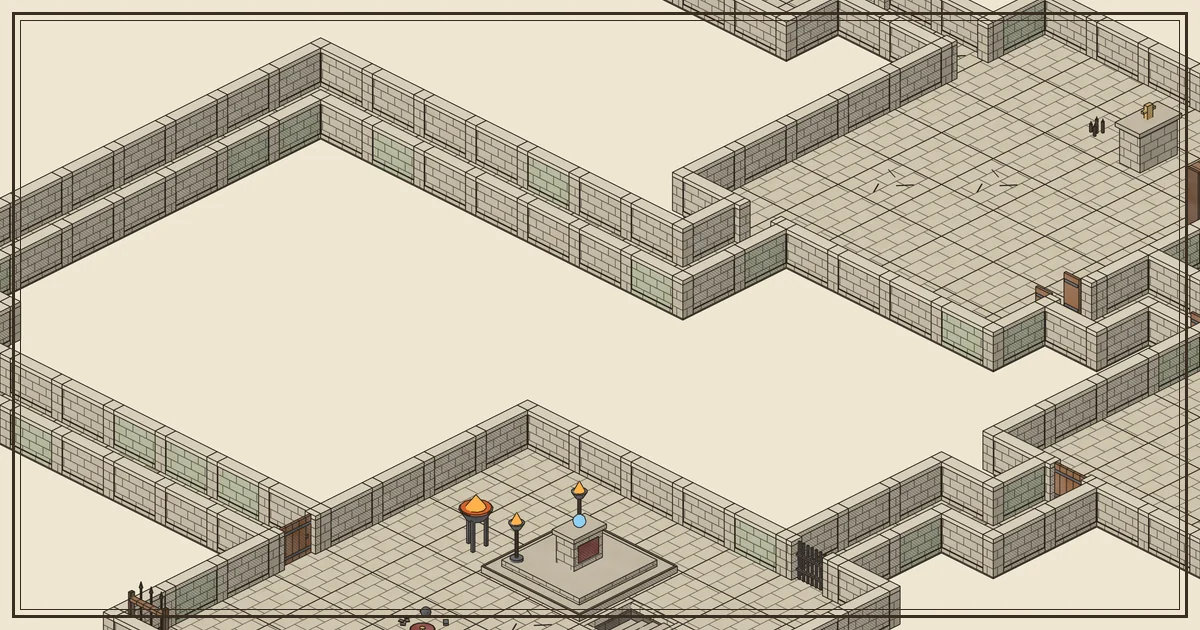
Every IsoDelve map is a single JSON document. It is small (the example below is about 16 KB, under 2 KB gzipped) because it never contains pixels. It describes what is where, and your client draws it from a cached art pack. This article walks through the document from top to bottom so you know which fields to read for drawing, for game logic and for storing a map.
All examples come from one real call to the live API:
curl -s -X POST https://api.isodelve.com/v1/maps \
  -H "Authorization: Bearer $ISODELVE_KEY" -H "Content-Type: application/json" \
  -d '{"pack":"ink-stone@1.1.0","seed":"my-first-dungeon","size":{"w":30,"h":24}}'
The header: identity and reproducibility
The first fields tell you which map this is and how to make it again.
{
  "id": "map_1t2nde66019682yc",
  "format": "isodelve-map@1",
  "generatorVersion": "gen-1.2.0",
  "seed": "my-first-dungeon",
  "pack": "ink-stone@1.1.0",
  "type": "inside-dungeon",
  "theme": "crypt",
  "params": { "size": { "w": 30, "h": 24 }, "rooms": { "min": 4, "max": 5 }, "knobs": { "secretRooms": 1, "decay": 0.3, "clutter": 0.5, "...": "..." } }
}idis the stored map. You can fetch it again withGET /v1/maps/{id}.json.formatis the document version. Check it before parsing so a future format never surprises your code.generatorVersion,seedandparamstogether are the recipe. Send the same three again and you get the same map, byte for byte, even after newer generators ship. Store them if you might need the map later.packis the exact art pack version the map was built for. Load that version, not “the latest”, when you draw it.
The grid: 5 ft squares and a palette
The grid object is the floor plan. One cell is one 5 ft square (cellFt: 5), the standard tabletop scale.
"grid": {
  "w": 30, "h": 24, "cellFt": 5,
  "palette": ["", "floor.slab.a", "floor.slab.d", "floor.cracked.a", "...", "wall.seg.full.a", "portal.door.closed", "vertex.corner.full", "..."],
  "floor": [0, 0, 0, 1, 2, 3, "..."],
  "floorRot": [0, 0, "..."],
  "edgeH": ["..."], "edgeV": ["..."],
  "vertex": ["..."], "vertexRot": ["..."]
}
Instead of repeating piece names thousands of times, the grid stores small numbers that index into palette. Index 0 (the empty string) means “nothing here”.
floorhasw × hentries (720 for a 30 × 24 map), row by row from the top-left. Entryy * w + xis the floor piece of cell (x, y).floorRotgives each floor tile’s rotation.edgeHholds the horizontal edges between cells. There is one more row of edges than rows of cells, so it hasw × (h + 1)entries (750 here). Walls, doors and archways live on edges, not in cells, which is why a door never takes up a square of floor.edgeVholds the vertical edges:(w + 1) × hentries (744 here).vertexandvertexRothold the posts where walls meet, at every grid corner:(w + 1) × (h + 1)entries (775 here). These are the corner, straight, T and cross joints that keep walls looking solid.
To draw a map, loop over the floor cells, then the edges, then the vertices, and place the sprite named by each palette entry. The art pack’s atlas data gives each sprite’s anchor point, so pieces line up without any per-map math beyond the isometric projection.
Rooms: purpose and contents
{ "id": "r4", "type": "boss", "bounds": [8, 11, 8, 7], "doors": ["d5", "d8"],
  "contents": ["prop.throne.a", "light.brazier.a", "light.brazier.a", "prop.banner.a", "prop.armor-stand.a", "prop.dais.a", "..."] }
bounds is [x, y, width, height] in cells, so this boss room is 8 squares by 7, or 40 ft by 35 ft. type is the room’s role: in this map there is an entrance, a shrine, a guard room, a treasure room and a boss room. contents lists what the generator furnished it with, which makes a handy prompt for room descriptions or encounter notes.
Secret rooms carry "kind": "secret" and ids like s1. In this map s1 is a small library tucked behind the treasure room. Normal rooms have no kind field.
Doors: open, closed, locked and secret
{ "id": "d11", "edge": { "x": 10, "y": 2, "dir": "v" }, "piece": "portal.secret.closed",
  "between": ["r1", "s1"], "state": "secret", "locked": false, "secret": true,
  "trigger": { "piece": "prop.bookshelf.a", "cell": [10, 1] } }
Each door sits on one edge (dir is h or v) and lists the two spaces it connects in between. state is open, closed or secret, and locked is a separate flag, so a closed door can be locked or not. A secret door uses a piece that looks like wall. Many secret doors also have a trigger, the prop that opens it, such as the bookshelf here. Treat triggers as GM-only notes: show them to the game master, never to players.
Props, lights and corridors
props places every piece of furniture: the piece id, the cell it stands on (at), its rotation (rot) and the room it belongs to. A few props are bigger than one square: the feast table covers 2 × 1 cells and the dais 2 × 2, and the generator keeps them clear of doors.
lights lists light sources with a position, a radius in feet and a color, for example a torch with radiusFt: 20. A VTT can feed these straight into dynamic lighting.
corridors lists the passages between rooms and the cells they cover.
Paths: the shape of the adventure
"paths": { "critical": ["r2", "r3", "r1", "r4"], "branches": [["r3", "r5"]], "deadEnds": [], "secret": [["r1", "s1"]], "breaches": [] }paths.critical is the route from the entrance to the boss room, in order. branches are optional side rooms, and secret pairs each secret room with the room it hides behind. The critical path never requires a secret door, so players can always finish the dungeon without finding one. That is useful for pacing encounters: put the essential fights on the critical path and the optional rewards on branches and secret rooms.
Renders and links
Finally, renders gives one PNG URL per angle (iso0, iso90, iso180, iso270) and links.self points back at the stored JSON. The PNGs need your API key and are cached after the first request. Add scale=0.5 or scale=0.25 for smaller images. Renders use short walls by default; add walls=full for tall walls, and secrets=hide for a player handout without the secret areas.
A checklist for your parser
- Check
formatequalsisodelve-map@1. - Load the art pack named in
packand cache it. - Draw
floor, thenedgeHandedgeV, thenvertex, thenprops, sorted back to front for your chosen angle. - Use
rooms,doorsandpathsfor game logic, fog of war and GM notes. - Store
seed,generatorVersionandparamsif you want to rebuild the map later.
The full field reference is in the API docs, and the gallery shows this exact map from all four angles.