 IsoDelve
Running isometric battle maps at the table: four angles, cutaway walls and line of sight
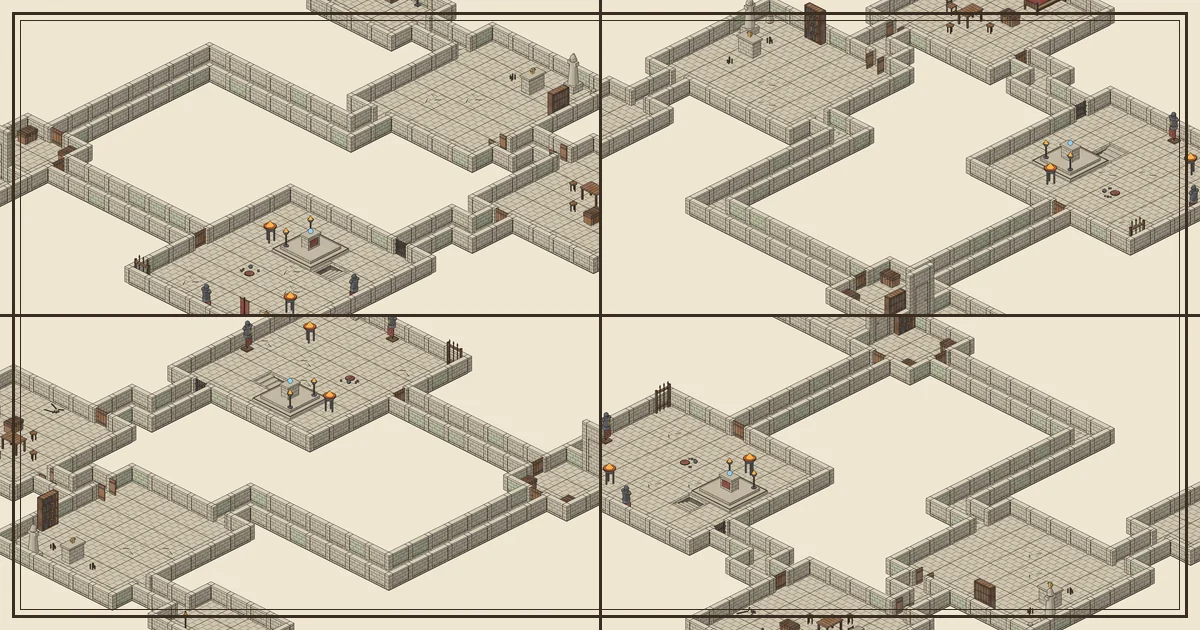
Top-down battle maps are easy to read: every square is a square and every wall is a line. Isometric maps trade a little of that clarity for something players love, which is a sense of place. Walls have height, a throne sits on a dais you can actually see, and a dungeon looks like somewhere you could stand. This guide covers the practical side of running isometric maps, whether you print them, show them on a TV or use them in a virtual tabletop.
The grid still works, it is just tilted
An isometric map is still a grid of 5 ft squares. It is drawn as diamonds instead of squares because the camera looks down at an angle. Movement and range work exactly as they do on a top-down map: count squares along the floor, not across the screen.
Two habits make this painless:
- Count along the floor lines. The floor tiles in an IsoDelve render have visible slab edges, so each diamond is one square. Moving “up the screen” is diagonal on the grid, so count the diamonds, not the screen distance.
- Use the room size. Every IsoDelve map file lists each room’s bounds in squares. A boss room listed as 8 × 7 is 40 ft by 35 ft. Say that out loud when players enter and they will picture it correctly.
Pick an angle, then change it when walls get in the way
The weakness of any isometric view is that tall walls hide whatever is behind them. A goblin standing against the far side of a wall can disappear from view. IsoDelve renders every piece of the dungeon from four directions (called iso0, iso90, iso180 and iso270), so the same map can be turned a quarter at a time.
At the table, that gives you a simple rule: when the action moves behind a wall, rotate the view. In a VTT built on the API, rotation is instant because it only swaps to the next angle’s sprites. If you print maps, print the two angles that show the most floor and keep both on hand.
Cutaway walls keep the floor visible
The second tool is wall height. Full-height walls look great in the overview but hide floor near the bottom of the screen. IsoDelve’s art pack includes cutaway versions of its wall segments, and the server renderer draws short walls (walls=cutaway) by default: players can see every square, and the room outlines still read clearly. Ask for walls=full when you want tall walls, or walls=auto to lower only the walls that would hide the floor.
A good pattern is full walls for the reveal (“you step into a vaulted shrine”) and cutaway walls once initiative is rolled.
Line of sight on an isometric map
Line of sight is decided by the grid, not by the picture. A wall on the map file is a wall on a cell edge, and that is what blocks sight and movement. The isometric art is only a view of it. If you use a VTT that reads the map file, let it compute sight from the walls and doors in the data. If you run in person, decide sight on the grid and use the art for atmosphere.
Doors matter here. Every door in an IsoDelve map has a state (open, closed or secret) and a separate locked flag. A closed door blocks sight until someone opens it, and a locked one needs a key, a check or a crowbar.
Secret doors and fog of war
Generated maps include secret rooms by default (you can turn them off). A secret door uses a piece that looks exactly like wall, so players see nothing unusual. For a printed or shared player map, request the PNG with secrets=hide: every secret door is drawn as plain wall and nothing behind it appears. The default secrets=show is the game-master view, with every secret door standing at full height. Many of them also have a trigger, such as a bookshelf, a sconce or a statue near the door, recorded in the map file as a GM note.
Some practical advice:
- Keep triggers GM-only. Don’t put the trigger list on a player screen. Use it when a player searches the right shelf.
- Reveal rooms as they are seen. On a VTT, hide unexplored rooms with fog of war and reveal each room when a character can see into it. Isometric fog looks best when whole rooms appear at once rather than square by square.
- Never block the main route. IsoDelve’s critical path from the entrance to the boss room never requires a secret door, so a party that finds nothing can still finish. Put optional treasure behind secrets, not the plot.
Printing and screens
Isometric maps are wider than they are tall. For a TV or monitor, a landscape render at half scale is usually sharp enough. For print, ask for full scale and print across two sheets, or crop to the room where the fight happens. Parchment background suits print; transparent background suits a VTT that draws its own backdrop.
Quick reference
| Situation | What to do |
|---|---|
| Counting movement | Count floor diamonds; 1 diamond = 5 ft |
| Action behind a wall | Rotate to the next angle |
| Combat starts | Switch to cutaway walls |
| Player searches for secrets | Check the door’s trigger in the map file |
| Party is lost | Remind yourself the critical path needs no secret door |
To see the four angles of one map side by side, open the gallery. To generate your own, start with the quickstart; the free plan covers 1,000 maps a month for personal games.